Exploring Virtual Private Cloud (VPC): A Key Component in Cloud Networking - PART 2
In the cloud, Virtual Private Cloud (VPC) allows organizations to create logically isolated sections within the public cloud. These sections operate like private data centers within a shared infrastructure, offering control, security, and flexibility. In this second part of our VPC series, we explore IP addressing, ports and protocols, load balancing, and VPC peering, all essential to secure and efficient cloud networking.
1. IP Addresses in VPC: Private vs. Public IPs
IP addresses in a VPC determine how resources interact, both within the VPC and with external networks.
Private IP Addresses: Used within the VPC for instances that only need internal communication. These addresses are not routable over the internet, making them ideal for backend servers or databases.
Public IP Addresses: Assigned to instances that need internet access, typically in public subnets. Public IPs are reachable over the internet and are often used for web servers, allowing external traffic to reach the resources.
For more information refer https://cloud.google.com/vpc/docs/ip-addresses
2. Ports and Protocols in VPC Networking
Ports and protocols define how data travels between applications and services within a VPC. Configuring these correctly is critical for both security and functionality.
Ports: Ports act like channels for network traffic, with each port corresponding to a specific service. For instance, HTTP typically runs on port 80, while HTTPS uses port 443. By controlling which ports are open, you can secure services in the VPC.
Protocols: Common protocols include:
TCP (Transmission Control Protocol): Connection-oriented, reliable, ensuring data delivery, used for web traffic, databases, etc.
UDP (User Datagram Protocol): Connectionless, faster but without guaranteed delivery. Often used for video streaming and real-time applications.
ICMP (Internet Control Message Protocol): Used for network diagnostics, like
ping.
Access Control: Security groups and Network ACLs (Access Control Lists) allow you to configure which ports and protocols can interact with your VPC resources. Security groups are instance-level firewalls, while ACLs provide subnet-level security.
3. VPC Peering: Seamless Inter-VPC Communication
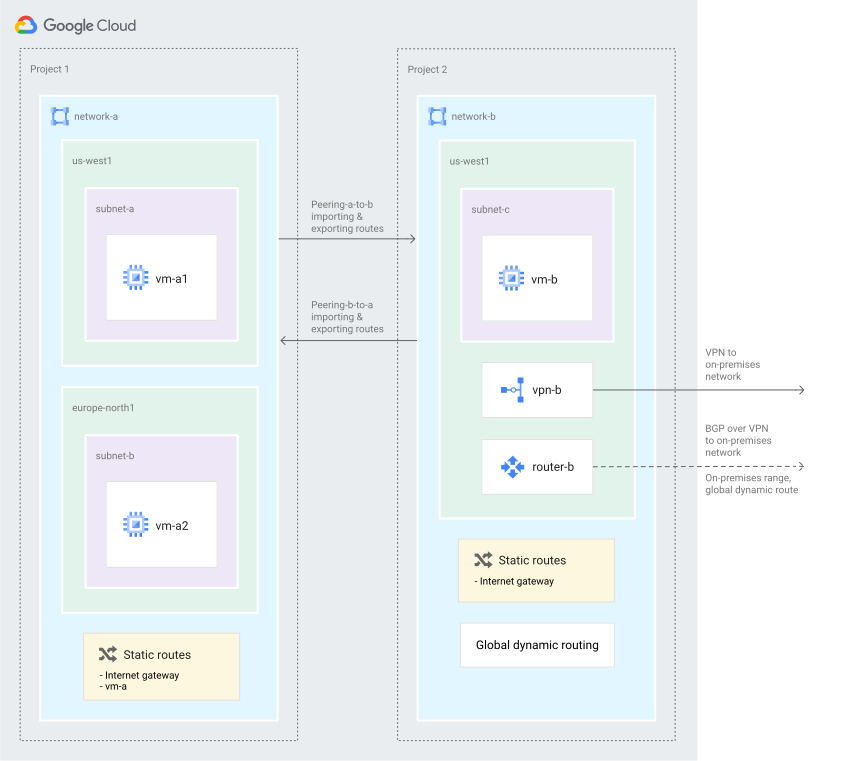
VPC peering connects two VPCs, allowing seamless communication as though they were in the same network. It's a private connection that avoids the public internet, ensuring more secure and reliable connectivity.
Direct Communication: Once a VPC peering connection is established, instances in each VPC can communicate with each other using their private IPs, without requiring additional network appliances or VPNs.
Use Cases: VPC peering is valuable for connecting VPCs across different accounts, departments, or business units, especially when sharing resources like databases or file servers.
Limitations:
Non-Transitive: If VPC A is peered with VPC B, and VPC B is peered with VPC C, VPC A cannot communicate with VPC C unless a direct peering connection exists between them.
You can only peer custom vpc’s in google cloud. Peering of two auto mode vpc’s is not possible due to overlap of ip adresses
4. Load Balancers and Their Types
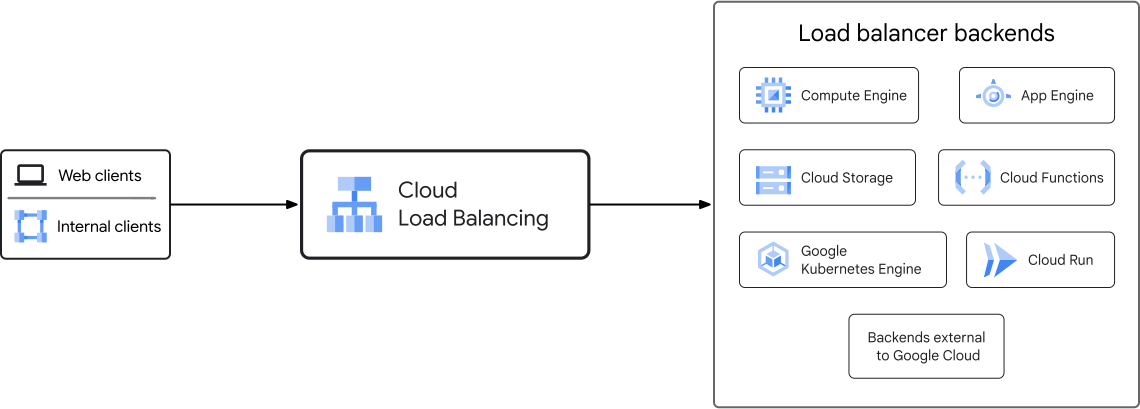
A load balancer distributes user traffic across multiple instances of your applications, ensuring availability, resilience, and performance.
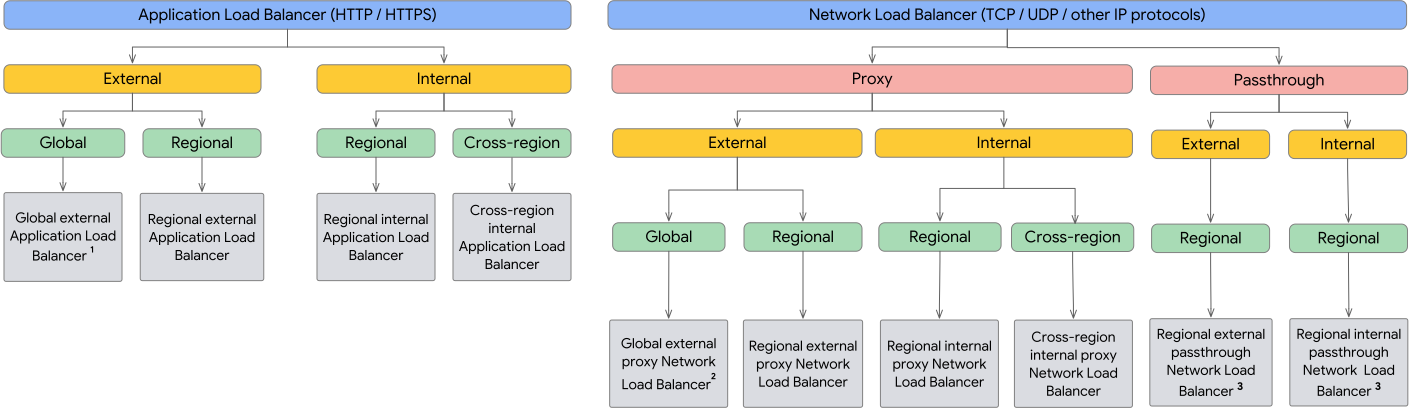
In a VPC, load balancers can be broadly categorized as Application Load Balancers and Network Load Balancers, with further subtypes for each.
Application Load Balancer (ALB):
Purpose: Operates at Layer 7 (Application layer) of the OSI model, which means it can make routing decisions based on application-level data, like HTTP headers, paths, and hostnames.
Types:
Internal ALB: Designed for load balancing internal traffic within a VPC. It doesn’t have a public IP, making it ideal for internal services that don’t need internet access.
External ALB: This load balancer has a public IP address and is used for routing internet traffic to resources in a VPC, such as web applications or APIs.
Use Cases: Web applications, APIs, microservices architectures
Network Load Balancer (NLB):
Purpose: Operates at Layer 4 (Transport layer), focusing on high-performance, low-latency traffic. NLBs are optimal for scenarios where speed and large-scale traffic handling are critical.
Types:
Proxy NLB: The load balancer proxies client requests, hiding the details of the backend servers. It allows the load balancer to manage connections and maintain some level of separation between clients and servers.
Passthrough NLB: This setup forwards the client’s IP and connection information directly to backend targets, allowing the servers to see the original client’s IP address. This is useful when the backend servers need direct access to client information.
Use Cases: Real-time applications, streaming services, financial applications, and any high-throughput or low-latency workloads.
The following diagram shows all of the available deployment modes for Cloud Load Balancing. For more details, see Choose a load balancer.